
 Français
User Reference Guide
Note: This documentation applies to current stable version. For older versions, start XSM without parameter to display list of available options.Summary
- Introduction to XSM
- Installing XSM
- Running XSM
- Parameter Statements
- the SORT/MERGE statement
- the RECORD statement
- the INPFIL statement
- the OUTFIL statement
- the INCLUDE/EXCLUDE (OMIT) statement
- the OUTFILDUP statement ***
 v6.94 ***
- the OUTREC statement
- the SKIP_HEADER[S] statement
- the OPTION statement
- the IOERROR statement
- the SORTWORKS statement
- the STORAGE statement
- Command-line Syntax
- Sample Sort Jobs: The best way to get into!
- Job 1 : Single text file
- Job 2 : Single text file, redirecting stdout stream
- Job 3 : Single text file, redirecting stdin,stdout streams
- Job 4 : Two Binary files, sortworks on distinct disks for I/O optimization
- Job 5 : Two Binary files, filtering records with OMIT
- Job 6 : CSV Text File with variable field length and field separator
Take a look at our ilustrated Demo - Job 7 : Binary file with Packed Decimal zones
- Job 8 : Text file with date field 'mmddyy', changing Y2K century pivot
- Job 9 : Several text input files with identification and removal of duplicate records
- Job 10 : Copy a text file and selective split onto several output files
- Job 11 : Sort a text file and selective split onto several output files
- Job 12 : Sort/Merge files and selective split onto several output files
- Job 13 : All In One : Merge + Deduplicate + Skip Header + Selective output with CSV
- Job 14 : Porting an MVS JCL step with XSM
- Destructive vs non destructive sort
- Performance Issues
- Running XSM as a User Exit
- Messages & Return Codes
- CHANGELOG
- FAQ
1. Introduction to XSM
XSM is a fast sort program that reads one or more input files, sorts all the lines or records according to user defined 'sort keys', and writes final result onto one or more files, according to user defined 'Include/Exclude' filters.
XSM can sort 2 kinds of files:
- Fixed length records files:
All records or 'lines' have the same length, including a trailing Carriage Return/Line Feed (DOS, OS2, Windows, ...), or a trailing Line Feed (UNIX), if any. They may or may not have: CR and LF are treated as others chars. -
Text files (Variable length records files), also called "flat files":
All lines are terminated by a CR/LF (DOS, Windows ...), or by a single LF (UNIX text files).
The sorting information (sort keys) in that lines may be at fixed columns (FIELDS) or in "variable length fields" (VFIELDS) separated by a given character (FIELDSEP).
Parmfile is mainly used to specify static parameters, such as sort fields, sortworks and options.
You can also specify parameters on command-line instead of using a parameter file. It is described below at Command-line Syntax section.
This is mainly used to specify variable parameters, such as input and output file names. Then you can make the most of Environment Variables in batch scripts (UNIX shells, Windows .bat) to pass XSM input/output file names.
It is recommended to make use of Parmfile and command-line parameters together:
- Parmfile contains static statements, such as sort fields and filtering options
*************** parameter file job1.xsm *********
 SORT     FIELDS=(14,7,C,A)   ; One sort key : position 14, length 7, Characters, Ascending
 RECORD   RECFM=V,LRECL=200   ; text variable format ended with CR/LF, max record length 200 car
 OMIT     DUPKEYS             ; shortcut for OMIT DUPLICATE KEYS filter
- Command-line contains dynamic variables such as input/output file names
hxsm690 --verbose --inpfile=/data/fp1.dat --outfile=/data/fp1.sorted job1.xsm
When starting, XSM will automatically compute the best memory and temporary disk files ("sortworks") usage for processing specified input files. So, for most usages, there is no need for XSM tuning.
Default XSM processing mode is "destructive sort" for optimal performance, as opposed to "stable". It can be parametered to non-destructive or "stable" sort mode.
See below "destructive/non-destructive sort" discussion.

2. Installing XSM
Installing XSM is easy and takes few minutes.
XSM consists of a single binary program 'hxsm', along with a "Use once and forget" license serial activation program 'hhnsinst'.
No hardware/software requirement is needed to run XSM on your Operating System.
Just read Installation Guide in UNIX/Linux or Windows flavor.
Once XSM is activated, you can rename it to whatever, move it to wherever you wish on the system.
Note that XSM binary is named 'hxsm' not to confuse with UNIX X11 Session Manager 'xsm'.
Tips:
-
It is recommended to use XSM program with a generic name, to ease XSM future releases updates without having to modify any batch scripts. In other words, get rid of release in XSM program name.
On UNIX, use symbolic links:$ cd /usr/local/bin $ # Let's use XSM release 6.71: $ ln -s hxsm671_Linux2.6.9-1.667_i686_32 hxsm $ ls -l hxsm* lrwxrwxrwx 1 root root 7 Apr 28 11:28 hxsm -> hxsm671_Linux2.6.9-1.667_i686_32 -rwxrwxr-x 1 root root 109160 Feb 19 2005 hxsm662_Linux2.6.9-1.667_i686_32 -rwxr-xr-x 1 root root 107744 Oct 31 2007 hxsm668_Linux2.6.9-1.667_i686_32 -rwxr-xr-x 1 root root 107744 Oct 28 2008 bin/hxsm669_Linux2.6.9-1.667_i686_32 -rwxr-xr-x 1 root root 100480 Feb 8 2010 hxsm671_Linux2.6.9-1.667_i686_32
- It is recommended to set PATH so that XSM calls do not need to specify the program full pathname:
- either by copying
hxsmprogram in a directory included in PATH:
for instance/usr/local/binon UNIX/Linux,D:\applicationson Windows - either by setting PATH in top of scripts (Shell UNIX, Windows .bat) to the directory containing XSM :
 PATH=/apps/xsm:$PATH
 export PATH
 hxsm -v myparmfile.xsm
- either by copying
An activated copy of XSM is bound to the Operating System is has been activated on. That is, if you copy the XSM binary program to another similar Operating System, you must activate it on the target OS.
3. Running XSM
Running XSM is quite simple:
1) Create a parameter file that describes the job to do:
- which files to sort (if not standard input)
- what kind of files: fixed length (binary), or text file
- what are the sort keys
- where to put the final result (if not standard output)
- what resources are to be used: memory, directories for temporary sortworks, ...
- optional features (deduplicate, filtering, ...)
2) At the OS command prompt --- a UNIX terminal or Windows cmd.exe ---, just type:
hxsm your-parmfile
3) Verbose switch:
You may follow your job running, with each step's details and duration by using the -v (verbose) or -vv (very verbose) switch:
hxsm -vv your-parmfile
4) Check switch:
Once the sort job is ended, you may want to check that the output
file is correctly sorted according to the parameter file.
Just use the -c switch:
hxsm -v -c your-parmfile
Note that there is a command-line with traditional switches described below, which may replace the parameter file in most cases. It is useful to specify input and output file names that come from environment variables.
Next section is the Parameter Statements.
For an easy start, see some Sample Sort Jobs below.
To display help, just run
 hxsm
   or
 hxsm -h
   or
 hxsm --help
4. Parameter Statements
XSM reads its parameters from a simple text file. We call it 'parameter file' or 'parmfile'.If you prefer not to use a parmfile, most statements can be given on the command-line.
The parameter file is a set of following statements:
    SORT/MERGE statement    - mandatory  if not OPTION COPY
    RECORD statement        - mandatory
    INPFIL statement        - optional
    OUTFIL statement        - optional
    OUTREC statement        - optional
    INCLUDE statement       - optional
    EXCLUDE|OMIT statement  - optional
    OUTFILDUP statement     - optional
    SORTWORKS statement     - optional
    IOERROR statement       - optional
    STORAGE statement       - optional
    OPTION statement        - optional
Statements can start at any column, though is it recommended to begin on columns 1 to 8 for readability.
Comments marks are:
- a semicolon
';'anywhere in a line, - or a star
'*'at the beginning of a line, - or a number/hash sign
'#'symbol at the beginning of a line.
# this is a comment
* this is a comment
; this is a comment
 INPFIL /tmp/data/myinput.file        ; this is a comment for my input file
Empty lines are permitted wherever you feel.
The SORT/MERGE statement
 SORT or MERGE     FIELDS=(start,length,type,direction[,start,len,type,direction,..])
                     or
                   FIELDS=(start,len,direction[,start,len,direction,..]),FORMAT=type
                     or
                   FIELDS=ALL
                     or
                   VFIELDS=(start,len,type,dir.[,start,len,type,dir.,..]),FIELDSEP=car

       start     : start column of sort field if fixed field (FIELD=)
                   field number if variable fields (VFIELDS=)

       length    : sort field length (FIELDS)
                   sort field max length (VFIELDS)

       type      : B or BI (Binary)      - binary field
                   C or CH (Char)        - normal ASCII characters (default)
                   I (Ignore case)
                   N or NU (Numeric)     - only '0' .. '9' characters (VFIELDS only)
                   P or PD (Packed)      - Packed decimal field
                                           (Binary files only, last half byte = sign)
                   Y or Y2K (yy)         - 2 bytes numeric field containing year of a date
                                           (would contain '84' for year 1984). Pivot year (option Y2KSTART,
                                           defaut 1970) is used to determinate if a year, for instance 17,
                                           means 1917 or 2017.  (see Y2K faq)


       direction : A (Ascending order), D (Descending order)

       FORMAT    : short form to use only when all sort keys have the same type
                   Thus, following statement
                        SORT FIELDS=(14,10,CH,A,24,10,CH,A)
                   can be simplified as
                        SORT FIELDS=(14,10,A,24,10,A),FORMAT=CH

       FIELDSEP  : The field delimiter/separator FIELDSEP sub-parameter value can be a symbolic name,
                   or a single character, or an hexadecimal value.

                   Using symbolic name is recommended for general punctuation chars to avoid syntax parsing
                   errors, specially with comments markers ';', '#'.

                   Symbolic names accepted:
                      BAR         =  the '|'  char
                      TAB         =  the Tabulation (X'09') char
                      COMMA       =  the ',' char
                      COLUMN      =  the ':' char
                      DIARESIS    =  the '#' char
                      SLASH       =  the '/' char
                      BACKSLASH   =  the '\' char
                      SEMICOLUMN   or SEMI-COLUMN   = the ';' char
                      SINGLEQUOTE  or SINGLE-QUOTE  = the "'" char
                      DOUBLEQUOTE  or DOUBLE-QUOTE  = the '"' char

                   Hexadecimal value: X'hh'
                      (Hex syntax : UPPERCASE X, Singlequote, 2 Hex digits, Singlequote)

                   Default value is TAB

                   Examples:
                      VFIELDS=(.....),FIELDSEP=SEMI-COLUMN
                      VFIELDS=(.....),FIELDSEP=@
                      VFIELDS=(.....),FIELDSEP=              ; Field separator is space char
                      VFIELDS=(.....),FIELDSEP=X'7C'
                      VFIELDS=(.....)                        ; Default Field separator is TAB


Command-line equivalent: --sort / --merge --key=
SORT verb is used for one or more input files.
MERGE verb is used to merge at least two files already sorted files.
To understand difference between SORT and MERGE, see SORT/MERGE discussion
One of SORT or MERGE statement is mandatory, unless using OPTION COPY
The FIELDS parameter describes sort keys at fixed column in the line (RECFM=V) or the record (RECFM=F).
FIELDS=ALL : the sort key is the whole record.
The VFIELDS parameter describes variable length sort keys separated by a given char.
This parameter cannot be used for Binary Files (RECFM=F).
When using VFIELDS, specify field separator with FIELDSEP=
 SORT FIELDS=(17,3,B,D,1,15,B,A)
     or
 SORT FIELDS=(17,3,BI,D,1,15,BI,A)
     or
 SORT FIELDS=(17,3,D,1,15,A),FORMAT=BI
This means:
- the 1st sort field starts at column 17 of each record, ends at col. 17 + 3 -1 = 19, type Binary, descending order,
- the 2nd sort field starts at col. 1 of each record, ends at col. 1 + 15 -1 = 15, type Binary, ascending order.
 SORT FIELDS=(2,4,B,A) ; will sort a long (32 bits) in Descending order
 SORT FIELDS=(6,2,B,D) ; will sort a short (16 bits) in Ascending order
 SORT FIELDS=(2,8,B,A) ; will sort a long (8x8=64 bits) in Descending order (created on a 64-bits OS)
Sorting a text file using a name at pos.12 for 20 bytes, ignore case:
SORT FIELDS=(12,20,I,A)
Sorting a Binary file using a packed decimal number at pos. 7 for 4 bytes, reverse order:
SORT FIELDS=(7,4,P,D) ; 7 BCD digits, with sign
Sorting a text file with variable fields, separated by ':', using:
- a name in field #12, max. length 20 bytes, ignore case:
- a number in field #7, at most 9 digits (chars '0' .. '9'), reverse order
SORT VFIELDS=(12,20,I,A,7,9,N,D),FIELDSEP=:
Same with a blank as field separator:
SORT VFIELDS=(12,20,I,A,7,9,N,D),FIELDSEP=
Same with the TAB char as field separator:
 SORT VFIELDS=(12,20,I,A,7,9,N,D),FIELDSEP=TAB
    or
 SORT VFIELDS=(12,20,I,A,7,9,N,D)  ;   FIELDSEP=TAB implied (default)
Dates like "mmddyy', pos. 21-26, descending order
SORT FIELDS=(25,2,Y,D,21,2,B,D,23,2,B,D)
Sorting whole lines in a text file:
SORT FIELDS=ALL
See XSM sample jobs
The RECORD statement
  RECORD RECFM=record format,LRECL=record length

   record format : F  for Fixed,
                   V  for Variable
                   T  for Text   (V and T are equivalent)
                   M  for MicroFocus "MFCOBOL"" or "MFVariable"

   record length : Exact record length for RECFM=F, including any separator CR/LF
                   Maximum record length for RECFM=V, excluding line separator CR/LF

Equivalent command-line parameter: --recfm= --lrecl=
The RECORD statement tells XSM if record type is fixed length or variable length.
The RECORD statement is mandatory.
With RECFM=V, LRECL is internally added by 2 to include CR/LF (Windows/UNIX flat text files)
RECFM=M is used for MicroFocus COBOL special variable format known as "MFCOBOL" or "MFVariable"
RECFM=M is used for Microfocus Variable Format Record Sequential File
special format, known as "MFCOBOL" or "MFVariable" composed of:
- a 128 bytes header
- a series of records [ Header ][ Variable length data ][ Padding ].
- a series of records [ 4 Bytes Record Descriptor Word (RDW) header ][ Variable length data ]
To process IBM Variable files received by FTP from DOS/VSE, MVS, z/VM, z/OS:
- Transfer FTP ASCII, Quote site NORDW (default):
Once on Unix/Windows, files are ASCII text, variable length records, terminated by CR/LF, without RDW.
For XSM, use RECORD RECFM=V,LRECL=xxxx (xxxx = maximum record length) - Transfer FTP ASCII, Quote site RDW :
Once on Unix/Windows, files are ASCII text, variable length records, terminated by CR/LF, with RDW (binary) prefix.
For XSM, use RECORD RECFM=V,LRECL=xxxx (xxxx = maximum record length) and shift (add +4) all sort key positions. - Transfer FTP Binary, without RDW:
Makes no senses as we don't know the record length.
- Transfer FTP Binary, with RDW:
Not supported by XSM.
Examples:
RECORD RECFM=F,LRECL=400
means that all the records have the same (fixed) length of 400 bytes
File size must be multiple of 400.
RECORD RECFM=V,LRECL=133
means that this is a text file, and that the maximum line length is 133 (excluding CR/LF);
See XSM sample jobs
The INPFIL statement
Form 1:
 INPFIL filename

        filename   : input file name

Command-line equivalent: --infile=
Form 2:
 INPFIL DD:varname

           varname   : Environment variable name holding input filename.
The INPFIL statement describes input file names.
The INPFIL statement is optional: if omitted, the standard input (stdin) will be used as input file (UNIX style redirection and pipe are allowed).
one INPFIL statement per input file
As of Versions 450/510, files may be specified 'a la MVS' by a ddname: DD:variable
In that case, XSM will get the 'dsname' (file name) via the corresponding environment variable.
 INPFIL C:\Myjob\BIGF.INP             # Windows
 INPFIL D:\TMP\Wrk.Dat                # Windows

 INPFIL /home/hh/bigf.inp             # UNIX
 INPFIL /home/hh/littlef.inp          # UNIX

 INPFIL DD:SORTIN1                    # any systems
 INPFIL DD:SORTIN2                    # any systems
 INPFIL DD:JOHNNY                     # any systems

# SORTIN1, SORTIN2, and JOHNNY are environment variables containing filenames
See XSM sample jobs
The OUTFIL statement
The OUTFIL statement defines output file names, and optional INCLUDE/EXCLUDE filters.It allows to define filters per output files.
The OUTFIL statement is optional: if omitted, the standard output will be taken as output file (redirection and pipe allowed).
Note: the output file may one of the input files and overrides it, but in SORT operations only.
Form 1 : output filename "hard" defined in the parameter file
 OUTFIL filename[,INCLUDE/EXCLUDE=(condition1,[AND/OR,condition2...)]
                [,RECFM=recfm][,LRECL=lrecl][,DISP=disp]

        filename   : output file name

        condition  : start,length,datatype,operator,pattern

                     start     : start pos of zone to compare
                     length    : length of zone to compare
                     type      : 'CH' (Char) or 'BI' (Binary)
                     operator  : EQ or NE or LT or LE or GT or GE
                     pattern   : C'cccc' where cccc = string to compare
                                 X'xxxx' where xxxx = hexadecimal string to compare
                                 N'nnnn' where nnnn = numeric value to compare

                                Length of string must equal length of zone to compare

        recfm :     output record format if different of the input one :
                    RECFM=V or RECFM=F


        lrecl :     output logical record length if different of the input one.
                    For RECFM=V (variable), record is truncated if output LRECL is smaller than input LRECL
                    Pour RECFM=F, truncate record of smaller than input LRECL,
                          add padding if larger that input LRECL


        disp :      "Disposition"  in case output file exists before XSM starts :
                       DISP=NEW       : abort of output file already exists
                       DISP=OVERWRITE : overwrites output file (default)
                       DISP=APPEND    : "Appends" if output file already exists


Command-line equivalent: --outfile=
Form 2 : output file is defined by an environment variable
OUTFIL DD:varname[,INCLUDE/EXCLUDE=(condition1,[AND/OR,condition2...)]
                  [,RECFM=recfm][,LRECL=lrecl][,DISP=disp]

           varname   : Environment variable name containing output filename.
Form 3 : FILE=nn / variable SORTOFnn association
Deprecated, maintained for compatibility withIBM DF/SORT and previous XSM releases. Use DD:varname form instead.
 OUTFIL FILE=nn[,INCLUDE/EXCLUDE=(condition1,[AND/OR,condition2...)]
                      [,RECFM=recfm][,LRECL=lrecl][,DISP=disp]

        FILEnn associates environmet variable SORTOFn where nn is an integer greater than 0.

Example :

 OUTFIL FILE=01,INCLUDE=(8,2,CH,EQ,75)       ; variable SORTOF1 for Paris department
 OUTFIL FILE=02,INCLUDE=(8,2,CH,EQ,14)       ; variable SORTOF2 for Normandie department
 OUTFIL FILE=971,INCLUDE=(7,3,CH,EQ,971)     ; variable SORTOF971 For Guadeloupe department
 ...
Examples:
 OUTFIL D:\TMP\BIGF.OUT                                  ;  Windows full pathname style, no filters

 OUTFIL /home/hh/bigf.out                                ;  UNIX full path name style, no filters

 OUTFIL DD:FOO                                           ; using FOO environment variable FOO, no filters

 OUTFIL DD:FOO2,EXCLUDE=(11,3,CH,EQ,C'POP')    ; drop records that match 'POP' in column 11

 OUTFIL /data1/clients1.dat,EXCLUDE=(11,3,CH,EQ,C'POP') ; same, but with hard coded filename
                                                         ; instead of a variable

 OUTFIL DD:XYZ1,INCLUDE=(11,3,CH,EQ,C'MAR',
                          OR,
                         11,3,CH,EQ,'GAS')               ; only write records that match 'MAR' or 'GAS'
                                                         ; at column 11

Note : Do not insert comments inside a conditional clause !
See sample job with COPY and selective output DD:...,INCLUDE=(...)
The INCLUDE/EXCLUDE/OMIT statements
INCLUDE defines conditions to keep records.
EXCLUDE or OMIT defines conditions to eliminate records.
Form 1 : Deduplicating, one or several output files
            NONE                     ; nothing suppressed (default, for IBM D/SORT compatibility)

            DUPLICATE KEYS           ; suppress all lines/recordsa with duplicate sort keys
         or DUPKEYS                  ; equivalent to DFSORT SUM FIELDS=NONE de DFSORT.
 OMIT    or DUPKEY

            DUPLICATE RECORDS        ; suppress duplicate lines/records
         or DUPRECORDS
         or DUPRECORD
         or DUPRECS
         or DUPREC

Command-line equivalent: --unique-key / --unique-record
You can write all duplicate records (on key or record) to a specific file,
Using statement OUTFILDUP, and option WRITEFIRSTDUPLICATE.
Form 2 : Conditional Filtering, only one output file
 INCLUDE
 EXCLUDE     COND=(column,length,type,operator,pattern[,AND|OR,col,len,type,oper,pattern,...])
 OMIT

      col        : start position of the field to be examined in each record (1..n)

      len        : field length

      type       : always 'CH' (useless but for IBM SORT compatibility...)

      operator   : one of 'EQ' 'NE' 'GT' GE' 'LT' 'LE'

      pattern    : constant C'ccccc...' where ccccc is characters string
                            X'xxxxx...' where xxxxx is hexadecimal value
               from v6.92 : N'nnnnn...' where nnnnn is numeric value
               from v6.93 : nnnnn...    where nnnnn is numeric value


Command-line equivalent: --include= / --exclude=
Successive INCLUDE,EXCLUDE statements (one statement per line) are processed with a 'AND' boolean operator.
  INCLUDE COND=(1,5,CH,GT,N'100')
  INCLUDE COND=(1,5,CH,LT,N'500')
is equivalent to:
INCLUDE COND=(1,5,CH,GT,100,AND,1,5,CH,LT,500)
INCLUDE COND=() or EXCLUDE COND=(...) statement works for only one output file.
As soon as there are several output files, You should use form 3 :
Form 3 : Selective Filter, several output files
 OUTFIL   DD:variable,INCLUDE|EXCLUDE=(col,len,type,op,pattern[,AND|OR,col,len,type,op,pattern ...])

 from v6.92 :
 OUTFIL   pathname,INCLUDE|EXCLUDE=(col,len,type,op,pattern[,AND|OR,col,len,type,op,pattern ...])
You can use EXCLUDE/INCLUDE operations with VFIELDS since v 6.92.
EXCLUDE and OMIT are synonyms.
Example 1:
 INCLUDE COND=(15,5,CH,EQ,C'JONES',OR,15,5,CH,EQ,C'SMITH')
 OMIT    COND=(11,3,CH,EQ,C'000')
These 2 filter statements mean:
- process records only if the field col.15-19 contains the names 'SMITH' or 'JONES'
- in the remaining set of records, throw away records where col.11-13 are equal to '000'
Example 2:
SORT    VFIELDS=(9,2,C,A,8,30,C,A,10,5,N,A),FIELDSEP=COMMA
RECORD  RECFM=V,LRECL=400

; ----------------  all clients:
OUTFIL  DD:ALLCLIENTS
; ----------------  only clients from New-York:
OUTFIL  DD:NEWYORKERS,INCLUDE=(9,2,CH,EQ,C'NY')
; ----------------  Client not in New-York:
OUTFIL  D:\data\app1\others.csv,EXCLUDE=(9,2,CH,EQ,C'NY')
; ----------------  only clients from Washingtown whose name start with AB, CD, or EF :
OUTFIL  DD:WASHDC,INCLUDE=(9,2,CH,EQ,C'WA',AND,
                              (11,2,CH,EQ,C'AB',OR,
                               11,2,CH,EQ,C'CD',OR,
                               11,2,CH,EQ,C'EF'))
These 3 OUTFIL filter statements mean:
- include all records into file defined by ALLCLIENTS environment variable
- include records with 9th field equals to "NY" into file defined by NEWYORKERS environment variable
- exclude these "NewYork" records to file
D:\data\app1\others.csv - include records with 9th field equals to "NY" AND 11th field starting with "AB" or "CD" or "EF" dans le fichier défini par la variable d'environment WASHDC
See XSM sample jobs
the OUTFILDUP statement
OUTFILDUP statement defines file in which duplicate records will be written, filtered on: OMIT DUPLICATE RECORDS or OMIT DUPLICATE KEYSIt can be either a full pathnamen or a variable:
    OUTFILDUP  /my/duplicate.file.txt

      ou

    OUTFILDUP  DD:Myvariable

Command-line equivalent: --outfiledup=
By definition, only duplicate records are written, but not the one that compares to duplicate.
To include this first record to duplicate file, use option WRITEFIRSTDUPLICATE or command-line flag --outfiledup-record1
The OUTREC statement
OUTREC statement is used to reformat records on output files.
There can be only one OUTREC statement.
If there are several output files, with OUTFIL DD:xxx,INCLUDE=(...) filters, then the OUTREC statement applies to all the ouput files.
The OUTREC statements formats records once they have been sorted and filtered ; So it is not necessary that output record contains sort keys.
Short Form :
  OUTREC  FIELDS=(start,length[,start2,len2...])

                 start    : start position

                 length   : field length

command-line equivalent: --outrec=
Long Form :
 OUTREC  FIELDS=(start,length,type,offset[,start2,len2,type2,offset2...])

                 start    : start position or padding value when type=B, P, or Z

                 length   : field length

                 type  C  : normal field to copy
                       S  : space padding
                       B  : byte : padding with value specified as 'start'
                       P  : Packed Decimal : Packed Decimal padding with value specified as 'start'
                       Z  : Zone Decimal : Packed Decimal padding with value specified as 'start'

                 offset : output position
Padding :
To padd with any given character, specify type B
and specify padding character as "start"
- either as a chararter,
- or as Hex value,
- or as Decimal value.
All following syntaxes are equivalents to specfy padding from position 33 on 10 with 'A' character :
Beginning of record, zone 1 to 32, is automaticaly space (blank) padded.
  OUTREC FIELDS=(C'A',10,B,33)
  OUTREC FIELDS=('A',10,B,33)
  OUTREC FIELDS=(A,10,B,33)
  OUTREC FIELDS=(X'45',10,B,33)
  OUTREC FIELDS=(X45,10,B,33)
  OUTREC FIELDS=(65,10,B,33)
  OUTREC FIELDS=(D65,10,B,33)
  OUTREC FIELDS=(D'65',10,B,33)
  OUTREC FIELDS=(N65,10,B,33)
  OUTREC FIELDS=(N'65',10,B,33)
If input field is longer than output zone, then field is truncated
On VFIELDS (variable length fields with delimiter), output offset means rank
If necessary, record will be left padded with FIELDSEP
OUTREC FIELDS=(1,5,C,1,
               2,5,C,12)
will move 2nd field to 12th position :
Input file :John;Smith;;123;Output file :
John;;;;;;;;;;;;Smith;
Truncation :
To truncate a record, either RECFM=F or RECFM=V, add LRECL= + desired length to the OUTFIL parameter.
Each OUTFIL file definition can have its own output LRECLRECORD RECFM=V,LRECL=300 ; input file specification ... OUTFIL DD:OUTNORMAL ; this file will use the input LRECL=300 OUTFIL DD:OUT_L40,LRECL=40 ; this file will have max 40 char record length OUTFIL DD:OUT_L100,LRECL=100 ; this file will have max 100 char record length
Reformating Samples
  SORT FIELDS=(10,12,C,A)                        ; sort keys on pos 10, length 12, Character, Ascending
  RECORD RECFM=V,LRECL=200                       ; input is variable length records ended with LR or CR/LF

  INPFIL  /usr/include/stdint.h                  ; input file

  IOERROR IGNORE                                 ; get rid of empty lines

  OUTFIL DD:SORTOUT,INCLUDE=(3,6,C,EQ,C'define') ; filters only ""# define ..." lines

  OUTREC FIELDS=(10,12,C,20)                ; puts zone 10 to 21 at position 20
Input file : /usr/include/stdint.h
/* Limits of integral types.  */

/* Minimum of signed integral types.  */
# define INT8_MIN               (-128)
# define INT16_MIN              (-32767-1)
# define INT32_MIN              (-2147483647-1)
# define INT64_MIN              (-__INT64_C(9223372036854775807)-1)
 ...
Output file :
                   INTMAX_MAX
                   INTMAX_MIN
                   INT_FAST64_M
                   INT_FAST64_M
                   INT_FAST8_MA
                   INT_FAST8_MI
                   INT_LEAST16_
                   INT_LEAST16_
 ...
Now add a 10 character '-' padding on position 1 :
 OUTREC  FIELDS=('-',10,B,1,
                  10,12,C,20)
Output file :
----------         INTMAX_MAX
----------         INTMAX_MIN
----------         INT_FAST64_M
----------         INT_FAST64_M
----------         INT_FAST8_MA
----------         INT_FAST8_MI
----------         INT_LEAST16_
----------         INT_LEAST16_
 ...
Now add a Line Feed (1 byte, length 1) at position 23 :
 OUTREC  FIELDS=('-',10,B,1,
                  10,12,C,20,
                  X'0A',1,B,23)
Output file :
----------         INT
MAX_MAX
----------         INT
MAX_MIN
----------         INT
_FAST64_M
----------         INT
_FAST64_M
----------         INT
_FAST8_MA
----------         INT
_FAST8_MI
----------         INT
_LEAST16_
----------         INT
_LEAST16_
 ...
The SKIP_HEADER[S] statement
 SKIP_HEADER nnn
 SKIP_HEADERS nnn

Command-line equivalent: --skip-header=   --skip-headers=
The SKIP_HEADER statement will skip nnn first records (lines) from first input file.
The SKIP_HEADERS statement will skip nnn first records (lines) from every input files.
If INCLUDE/EXCLUDE filter is used, filter applies to records remaining after nnn first records skipped by SKIP_HEADER.
SKIP_HEADER and SKIP_HEADERS are mutually exclusives.
Example:SKIP_HEADER 4 # ignore 4 premières lignes d'entete du fichier
See XSM sample job with SKIP_HEADER
The OPTION statement
 OPTION  option1,option2,...
    or
 OPTIONS  option,option,...
where options are:
This option has meaning only for fields of type 'Y' or 'Y2K' (see below)
or
COLLATE=EBCDIC
It will keep ASCII characters keys in the following order:
- first, all lower-case letters,
- then all upper-case letters,
- and finally the digits 0..9
or
RSEP=byte
This option is primarily used for OPEN MVS and OS/400 for variable length files.
It defines a specific character (1 byte) at the end of each record to be considered as the Record Separator.
Defaults:
RSEP=0D (Windows)
RSEP=15 (Open MVS)
RSEP=25 (OS/400)
 OPTION RSEP=|
  or
 OPTION RSEP=7C
Command-line equivalent: --record-separator=
or
PROCESSORS=n
or
PROCS=n
For example, if you have a 8-CPU on a modern hardware, feel free to have such statement in your parmfile, that will boost sort time:
OPTION PROCS=8
It is recommended to let XSM decide for optimal resources use.
Command-line equivalent: --procs=or
KEEPORDER=Y|N
or
EQUALS
See explanation on stable sort below. Command-line equivalent: --keep-order
It tells XSM to selectively copy the input file(s) onto one or more output files.
Following COPY statements are equivalents, for IBM DF/SORT compatibility :
 OPTION COPY
   or
 SORT FIELDS=COPY
   or
 COPY

Command-line equivalent: --copy
COPY statement can followed by one or more following statements:
 OUTFIL DD:variable                    ; equivalent to OUTFIL DD:variable,INCLUDE=ALL
   or
 OUTFIL DD:variable,INCLUDE|EXCLUDE=(condition1[,AND/OR,condition2...])
See the 'OUTFIL' statement below See sample job with COPY and selective output DD:...,INCLUDE=(...)
ou
WRITEFIRSTDUP
With option "Write First Duplicate", this first record is also written to duplicate file.
  OMIT DUPKEYS

  #  Output file, deduplicated:
  OUTFIL     myoutput.txt

  # output file with duplicate records:
  OUTFILDUP  myduplicate.txt

  #  this is to write also first record that compared to duplicate
  OPTION WRITEFIRSTDUPLICATE


Command-line equivalent: --outfiledup-record1 ou --dup-rec1
Sample input file, we will sort on last name, first name:
01234001 JOHN     PALMER
05678001 BOB      JOHNSON
01234002 JOHN     PALMER
05678002 BOB      JOHNSON
06095300 KAREN    SMITH
Result of output duplicate data : (OUTFILDUP myduplicate) without WRITEFIRSTDUPLICATE option:
01234002 JOHN     PALMER
05678002 BOB      JOHNSON
Result of output duplicate data : (OUTFILDUP myduplicate) with WRITEFIRSTDUPLICATE option:
05678001 BOB      JOHNSON
05678002 BOB      JOHNSON
01234001 JOHN     PALMER
01234002 JOHN     PALMER
Example of OPTION statement usage:
OPTION PROCS=4,KEEP_ORDER=Y # force multithreading on 4 procs, force stable sort
The IOERROR statement
 IOERROR IGNORE

Command-line equivalent: --ignore-ioerror
The IOERROR statement is valid for variable length text (RECFM=V) files only.
It tells XSM what to do when a record is shorter than a defined key:
- if omitted, the first line shorter than the sort key will cause XSM to 'ABEND' (Abnormal end) immediately.
- if present, errors due to lines shorter than sort key will be ignored.
The SORTWORKS statement
 SORTWORKS directory[,directory,...]

           directory : one or more directory full path for temporary work files.


Command-line equivalent: --sortworks=
The SORTWORKS statement is used to control where to put work files on different drives, or UNIX file-systems (recommended)
Examples:SORTWORKS C:\TMP,D:\TEMP (OS2, WIN32) SORTWORKS /var/tmp,/tmp (UNIX)
The SORTWORKS statement is optional: if omitted, all work files are created (then deleted after use) in the current directory.
*** Using SORTWORKS properly is essential for performance ***
When more than one sortworks directory is given, XSM will force multi-threading: one thread per directory.
When OPTION PROCS= is specified together with SORTWORKS=dir1,dir2,...,dir_n, XSM will use max of both values for threads number.
Using temporary workfiles on another physical disk than the one having input/output files will dramatically improve XSM performance as it will reduce concurrent I/O on a single disk.
Indeed, to simplify, consider XSM I/O phases are:
       Phase 1 :   reading input file  +  writing sortworks
-------------------------------------------------------------------------
       Phase 2 :   reading sortworks   +  writing output file
Using input + ouput on one disk, sortworks on another disk will produce best results:
                                          (Disk1)    (Disk2)
   Phase 1 :   reading input file          Read
             + writing sortworks                      Write
-------------------------------------------------------------------------
   Phase 2 :   reading sortworks                      Read
             + writing output file         Write
Using input on same disk than sortworks, output on another disk will produce poor results:
(Disk1) (Disk2)
Phase 1 : reading input file Read
+ writing sortworks Write <==  Concurrent I/O on same disk: BAD!
-------------------------------------------------------------------------
Phase 2 : reading sortworks Read
+ writing output file Write
Concurrent I/O on same disk: BAD!
-------------------------------------------------------------------------
Phase 2 : reading sortworks Read
+ writing output file Write
This illustrates the same sort operation, with one disk / with two disks:
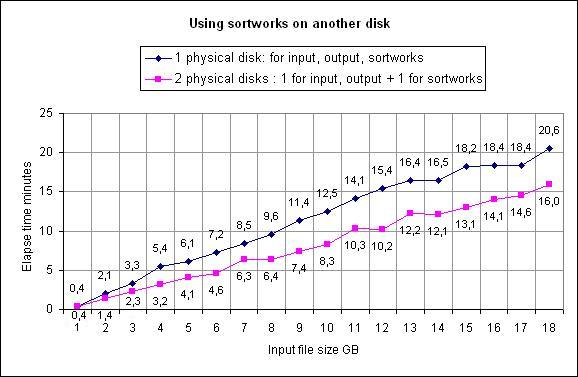
Please note than results highly depend on factors such as filesize, free memory,
disk speed, CPU speed.
Above chart just illustrates that using different physical hard disks will improve sort time with no doubt.
Temporary files are named after the current XSM Process Id, srtw04d2.xxx for instance
for Pid 1234 (hexa 04d2). So running several XSM simultaneously using same SORTWORKS directories
is not a problem.
Temporary files are deleted upon job completion.
In case of a severe error they may remain on disks so it is wise to check XSM return code.
See XSM sample jobs
The STORAGE statement
 STORAGE size{K|M|G}

      size      : amount of main storage to use, in Kilobytes, Megabytes, or Gigabytes.

     Examples:

            STORAGE 450K
            STORAGE 2150K
            STORAGE 8M

            Paramètre équivalent ligne de commande : --storage=
The STORAGE statement is optional. It is calculated by XSM, depending on your Operating System and input files.
For huge files, it can be used to limit paging/swapping leading to System Stress.
        T = total input size in Megabytes

        T ≤ 64517 MB  :  STORAGE = square root( T ) / 4

        T > 64517 MB  :  STORAGE = T / 1020
For instance, 3 input files of 25000 MB:
        T = 3 x 25000 = 75000 (MB)

        STORAGE =  75000 / 1020 = 74MB
STORAGE 74MB can improve performances
Most of the times, it is recommended to let XSM decide for optimal resources use.
5. Command Line Syntax
The XSM Sort/Merge program is invoked from the system command-line.
You may call XSM with or without parameter file.
Once you have manually setup XSM parameters and options, just plug the command-line in your batch program: UNIX Shell, Windows .bat or whatever is your favorite batch language.
The full syntax is displayed if you start XSM without any flag, or with --help flag :
hxsm [options]

Options:

  -c, --check           check result of a previous sort/merge operation and issues message
                        "XSM064I The file xxx correctly sorted" on success

  -q, --quiet           run in quiet mode with no information displayed on stderr, unless an error occurs
                        Note that stdout is reserved for default output if no output specified

  -v, --verbose         display details while processing
                        -v/--verbose and -q/--quiet are mutually exclusive

   -vv, --veryverbose   displays more details

  -h, --help            display help and exit


      --sort            sort operation (default)

                        Parmfile equivalent: SORT


  -m, --merge           merge pre-sorted files

                        Parmfile equivalent: MERGE


      --copy            copy without sorting, but can filter with INCLUDE/EXCLUDE/SKIP_HEADER and reformat
                        with OUTREC.

                        Parmfile equivalent: OPTION COPY

                        --sort --merge --copy are mutually exclusive


  -k, --key=start,len[,direction,[type]]
                        sort key definition:
                        start     :  starting position (relative to 1)  for that key.
                        length    :  key length, in bytes
                        direction :  'D' = descending, 'A' = ascending
                        type      :  'C' = character
                                     'B' = binary byte ("low value" in Cobol)
                                     'I' = ignore Upper/lower case
                                     'N' = numeric
                                     'P' = Packed decimal field (RECFM=F or M files only)
                                     'Y' = Year in a date

                        Parmfile equivalent: SORT FIELDS=(start,len,dir,type)


  -k all, --key=all     sort using whole record as key

                        Parmfile equivalent: SORT FIELDS=ALL


  -r, --recfm=F|V|M     specify Record Format, can be F (Fixed), V (variable), M (MFCobol)
                        default is V (variable)

                        Parmfile equivalent: RECORD RECFM=


  -l nnn, --lrecl=nnn   specify Logical Record Length (LRECL):
                          nnn = exact record length for RECFM=F, including any separator CR/LF
                          nnn = max record length for RECFM=V, excluding line separator CR/LF

  -z nnn         same as -l nnn (for UNIX compatibility)

                        Parmfile equivalent: RECORD LRECL=


      --infile=file[,recfm=x[,lrecl=nnn]   specify input file(s)
                        RECFM and LRECL can be specified together with an input file when reformatting.
                        See Reformatting

                        multiple input files can be specified, as follow:
                        --infile=/tmp/f1 --infile=/tmp/f2 ...

                        Parmfile equivalent: INPFIL


  -o, --outfile=fileout[,recfm=F|V|M[,lrecl=nnn]] specify output file
                        File can be specified as full file name, DD:variable, of FILE=nn
                        (see Form 1, 2 and 3 of OUTFIL statement)
                        RECFM and LRECL can be specified together with an output file when reformatting.
                        See Reformatting

                        Parmfile equivalent: OUTFIL


      --outrec=(pos,len[,p2,l2,...])
      --outrec=(pos,len,type,offset[,p2,l2,t2,o2,...]) specify output record
                        when reformatting.
                        See Reformatting

                        Parmfile equivalent: OUTREC


  -uk, --unique-key     drop next records with duplicate keys, 1rst one is kept

                        Parmfile equivalent: OMIT DUPLICATE KEYS


  -ur, --unique-record  drop duplicate records, 1rst one is kept

                        Parmfile equivalent: OMIT DUPLICATE RECORDS


      --outfiledup=fileout  writes duplicate records to a file     *** v6.94 ***

                        Parmfile equivalent: OUTFILDUP


      --outfiledup-record1  Includes first record that compares to duplicate in duplicate file.
      --dup-rec1            Without this option only next duplicate records are written to duplicate file.
                            See sample.    *** v6.94 ***

                        Parmfile equivalent: OPTION WRITEFIRSTDUPLICATE


       --include=start,len,op,val[AND|OR,start,len,op,val...] specify include filter

                        Parmfile equivalent: INCLUDE


       --exclude=start,len,op,val[AND|OR,start,len,op,val...] specify exclude filter

                        Parmfile equivalent: EXCLUDE


 -t dir1,dir2  --sortwork[s]=dir1,dir2,...    sortworks directory list
                        you can specify several directories, separated by comma (,) or
                        issue several --sortworks=  or -t :

                        --sortworks=/tmp1/dir1 --sortworks=/tmp/dir2
                               equivalent to:
                        --sortworks=/tmp1/dir1,/tmp/dir2
                               equivalent to:
                        -t /tmp1/dir1 -t /tmp/dir2
                               equivalent to:
                        -t /tmp1/dir1,/tmp/dir2

                        Parmfile equivalent: SORTWORKS


  -y nnnK|M|G, --storage=nnnK|M/G force storage allocation to nnn Kilo/Mega/Gigabytes
                        in most cases, better to let XSM calculate by itself
                        to use only when slow processing on very large files

                        Parmfile equivalent: STORAGE


      --keep-order      force non-destructive sort, also called "stable sort"
                        see explanation below.

                        Parmfile equivalent: OPTION KEEP_ORDER


      --record-separator=C|0xhh  defines the characters or pair of characters at the end
                        of each record.  This option is primarily used for OPEN MVS and OS/400 for variable
                        length files.

                        Parmfile equivalent: OPTION RECORD_SEPARATOR


      --collating-sequence=ebcdic force alphanumeric sequence to IBM's EBCDIC

                        Parmfile equivalent: OPTION COLLATING


      --skip-header=nnn  ignore nnn first records of first input file

                        Parmfile equivalent: SKIP_HEADER


      --skip-headers=nnn ignore nnn first records of all input files

                        Parmfile equivalent: SKIP_HEADERS

      --throw-empty-records ignore empty records. Without this option, XSM will stop with an error if
                         it encounters empty (length=0) record on input stream.

  -i, --ignore-ioerror  ignore lines shorter that sort keys (text file RECFM=V only)

                        Parmfile equivalent: IOERROR IGNORE


  -n n, --procs=n       force multi-threading to n Threads
                        Parmfile equivalent: OPTION PROCS

      --norun           test syntax of parmfile only. does not process
Short and long options can be mixed together, as follow:
hxsm --input-file=/tmp/f.in -o/tmp/f.out myparms.xsmFor an easy start, see below samples jobs.
6. Sample sort jobs: The best way to get into!
Job 1 : Single text file
- The largest expected line is 200 char. long (excluding the trailing CR/LF)
- The sort key is a char field starting col 14 to 20. Key length = 20 - 14 + 1 = 7
Input file looks like:0 1 1 2 3 0123456789012345678901234567890123456 ... |....+....|....+....|....+....|....+..... ABCDEF PARIS 001HHNS A123456 2010-12-31... [ key ] : starts col 14, ends col 20 - The input file is 'SAMPLE.INP'
- The output file is 'SAMPLE.OUT'
Method 1: input/output files are specified using UNIX style redirections
Command-line without parmfile:
 hxsm --recfm=V --lrecl=200 --key=14,7,A  < SAMPLE.INP > SAMPLE.OUT

       or

hxsm -r V -l 200 -k 14,7,A  < SAMPLE.INP > SAMPLE.OUT
Command-line using parmfile:
hxsm job1.xsm < SAMPLE.INP > SAMPLE.OUTParmfile job1.xsm :
 SORT     FIELDS=(14,7,C,A)      ; one sort key in position 14, length 7, type Char, Ascending
 RECORD   RECFM=V,LRECL=200      ; Variable length, maximum expected length is 200
Method 2: input/output files are "hard coded" in parmfile
Parameter file job1.xsm:SORT FIELDS=(14,7,B,A) ; one sort key in position 14, length 7, type Binary, Ascending RECORD RECFM=V,LRECL=200 ; Variable length, maximum expected length is 200 INPFIL SAMPLE.INP ; Input file OUTFIL SAMPLE.OUT ; Output fileCommand-line using parmfile:
hxsm -vv job1.xsm
Method 3: Command-line without parmfile:
 hxsm -vv -k 14,7 -l 200 < SAMPLE.INP > SAMPLE.OUT

    or

 hxsm -vv -k 14,7 -l 200 -o SAMPLE.OUT   SAMPLE.INP

    or

 hxsm -vv --key=14,7 --lrecl=200 --outfile=SAMPLE.OUT --infile=SAMPLE.INP
Job 2 : Single text file, redirecting stdout stream
- Same as above, but the output will be redirected to a report program named 'MYREPORT.EXE'
# Job 2 : OUTFIL is not specified, so XSM will output on stdout
#        This is used to redirect output to another program
 SORT     FIELDS=(14,7,B,A)
 RECORD   RECFM=V,LRECL=200
 INPFIL   SAMPLE.INP
Command-line:
hxsm -vv job2.xsm | myreportCommand-line without parmfile:
hxsm -vv -k 14,7 -i SAMPLE.INP | myreportIf you want all identical lines except first to be dropped, add -ur (or --unique-record) option:
 hxsm -vv -ur -k 14,7 -i SAMPLE.INP | myreport

   or

 hxsm -vv --unique-record --key=14,7 --infile=SAMPLE.INP | myreport
Job 3 : Single text file, redirecting stdin, stdout streams
- Same as above, but the input comes from an accounting program named 'MYACCOUNT.EXE'
# Job 3 : neither INPFIL nor OUTFIL are specified:
#         UNIX style redirections are used instead
 SORT     FIELDS=(14,7,B,A)
 RECORD   RECFM=V,LRECL=200
Command-line:
myaccount | hxsm job3.xsm | myreportCommand-line without parmfile:
myaccount | hxsm -k 14,7 | myreport
Job 4 : Two Binary files, sortworks on distinct disks for I/O optimization
- All records are 180 char. long
- The sort key is an account number col 14 to 20, plus a date (yymmdd) col 2 to 7
- For each account, records are to be sorted on decreasing date
- The input files are '../s1' and '../s2', each about 4 Megabytes large
- The output file is '/usr/acct/sample.out'
- The second drive is mounted as /var so we use 2 sortwork directories on 2 distinct disks for I/O optimization.
See Sortworks discussion to understand benefit.
# job4.xsm  : XSM parameter file for job4
#------------  Sort keys :
 SORT      FIELDS=(14,20,B,A,2,6,B,D)
 RECORD    RECFM=F,LRECL=180

#------------  input/output files:
 INPFIL    ../s1                              ; input file #1
 INPFIL    ../s2                              ; input file #2
 OUTFIL    /usr/acct/sample.out               ; output file

#------------  temp files :
 SORTWORKS /drive1/tmp,/drive2/tmp            ; 2 sortwork directories
Command-line:
hxsm -vv job4.xsmCommand-line without parmfile:, using short options:
 hxsm -vv -k 14,20 -k 2,6,d -r F -z 180             \
      -t /var/tmp,/tmp                          \
      -o /usr/acct/sample.out ../s1 ../s2
The same using long options style (more readable):
 hxsm -vv  --key=14,20   --key=2,6,d   --recfm=F   --lrecl=180    \
        --sortwork=/var/tmp,/tmp                                  \
        --outfile=/usr/acct/sample.out                            \
        --infile=../s1    --infile=../s2
Job 5 : Two Binary files, filtering records with OMIT
- Same as above, but only records which do not start with a '*' are to be processed
# job5.xsm  : XSM parameter file for job5
#------------  Sort keys :
 SORT      FIELDS=(14,20,B,A,2,6,B,D)
 RECORD    RECFM=F,LRECL=180

#------------  input/output files:
 INPFIL    ../s1                              ; input file #1
 INPFIL    ../s2                              ; input file #2
 OUTFIL    /usr/acct/sample.out               ; output file

#------------  temp files :
 SORTWORKS /drive1/tmp,/drive2/tmp            ; 2 sortwork directories

#------------  filters :
 OMIT        COND=(1,1,CH,EQ,'*')             ; exclude records with character '*' on position 1
Command-line:
hxsm job5.xsmCommand-line without parmfile:
 hxsm   --key=14,20   --key=2,6,d   --recfm=F   --lrecl=180     \
        --sortwork=/var/tmp,/tmp                                \
        --outfile=/usr/acct/sample.out                          \
        --infile=../s1    --infile=../s2                        \
        --exclude="1,1,C,'*'"
Job 6 : CSV Text File with variable field length and field separator
- Line size is maximum 100 chars, excluding UNIX LF or Windows CR/LF
- 1st key: a name, 3rd field, max length 40 bytes, ignore case, ascending
- 2nd key: a number, 2nd field, max length 10 digits (char '0' .. '9'), descending
- Drop lines with duplicate keys, except the 1st one
 SORT      VFIELDS=(3,40,I,A,2,10,N,D),FIELDSEP=SEMICOLUMN  ; Variable length fields delimited by ';'
 RECORD    RECFM=T,LRECL=100
 INPFIL    ../s1
 OUTFIL    /usr/acct/sample.out
 OMIT      DUPKEYS               ; short for OMIT DUPLICATE KEYS
Note: Defining Field Separator with symbolic keywords SEMICOLUMN, COMMA, etc... is recommended to avoid syntax parsing errors, specially with comments markers ';', '#'. See FIELDSEP= syntax.
Command-line:hxsm job6.xsmNo full command-line equivalent for this job, due to VFIELD
Job 7 : Binary file with Packed Decimal zones
- Record length is 110 bytes,
- 1st key from pos. 1 to 4, "Packed Decimal", descending order,
- 2nd key from pos. 21 to 40, Alphanumerical, ascending order.
 SORT      FIELDS=(1,4,P,D,21,20,B,A)           ; type P means Packed decimal
 RECORD    RECFM=F,LRECL=110
 INPFIL    E:\tmp\s1.bin
 OUTFIL    E:\tmp\s2.bin
Command-line:
hxsm job7.xsmCommand-line without parmfile:
hxsm -r F -l 110 -k 1,4,P,D -k 21,20 -o E:\tmp\s2.bin E:\tmp\s1.binSame using long options :
hxsm --recfm=F --lrecl=110 --key=1,4,P,D --key=21,20 --outfile=E:\tmp\s2.bin --infile=E:\tmp\s1.bin
Job 8 : Text file with date field 'mmddyy', changing Y2K century pivot
- text lines are at most 110 bytes long, excluding the trailing CR/LF,
- 1st key pos. 1-4, Alphanumeric, ascending order,
- 2nd key pos. 21-40 Alphanumeric, ascending order,
- 3rd key pos. 61-66 date like 'mmddyy', descending order
- the oldest date is past the year 1970 (default Y2K pivot).
 SORT      FIELDS=(1,4,BI,A,21,20,BI,A,65,2,Y2K,D,63,2,BI,D,61,2,BI,D)
 RECORD    RECFM=V,LRECL=110
 INPFIL    /tmp/s1.txt
 OUTFIL    /tmp/s2.txt
Command-line:
hxsm job8.xsmNo full command-line equivalent for this job, because this 'Y2K' feature is supported only in parameter files. To change the default Y2K Pivot = 1970 and consider dates with YY < 70 (that is 1970) belonging to the 21st century (20..) instead of the 20th century (19..), just add the Y2K pivot statement:
 OPTION Y2KSTART=19nn

 Example:
 OPTION Y2KSTART=1963   # changing Y2K pivot from 1970 to 1963
64, 65, .... 99 will be processed as 19NN
00, 01, ... 63 will be processed as 20NN
See FAQ, Y2K for explanation on Y2K pivot.
Job 9 : Several text input files with identification and removal of duplicate records
- Text lines are at most 100 bytes long, excluding the trailing CR/LF,
- Records with duplicate keys are removed
- We merge a monthly file and daily file for input
Input file data.monthly.2020.04.txt:
00001 PALMER JOHN 0012343445T46767878 00002 JOHNSON BOB 04E3293223235454654 00003 SMITH KAREN 0012343345665766887 00004 PALMER MIKE 0432434545657675606 00005 SMITH JACK 0046546507675465778 |
Input file data.daily.2020.04.05.txt:
00001 PALMER MIKE 0432434545657675606 00002 SMITH KAREN 0012343345665766887 00003 WOOD PAUL 0343256556560767657 |
#0001    PALMER    JOHN
#        |         |
#        pos 10    pos 20
#             |         |
 SORT FIELDS=(10,10,C,A,20,10,C,D)                 # sort keys : Last Name, First Name
 RECORD RECFM=V,LRECL=100

# Adds daily data to monthly data :
 INPFIL     data.monthly.2020.04.txt               #  Monthly input
 INPFIL     data.daily.2020.04.05.txt              #  Daily input

 OUTFIL     data.monthly.deduplicated.2020.04.txt  # Montly deduplicated data

 OMIT DUPLICATE KEYS
 OUTFILDUP  data.monthly.duplicated.2020.04.txt    # Montly duplicated data
Command-line using parmfile:
hxsm -vv dedup.xsmCommand-line without parmfile:
hxsm -vv --recfm=V --lrecl=100 --key=10,10,A --key=20,10,D   \
       --infile=data.monthly.2020.04.txt                     \
       --infile=data.daily.2020.04.05.txt                    \
       --outfile=data.monthly.deduplicated.2020.04.txt       \
       --unique-key                                          \
       --outfiledup=data.monthly.duplicated.2020.04.txt
XSM run:
XSM056I HXSM V6.94-64 - (C) HH&S 1996-2020, Build Jul  5 2020
XSM096I Parameter file dedup.xsm loaded. 7 valid statements
XSM096I   key # 1 start   10, len  10, order ASCEND , type CHAR
XSM096I   key # 2 start   20, len  10, order DESCEND, type CHAR
XSM027I Initializing ...
XSM096I Using 2 nCPU, 4 Threads
XSM089I Memory Total 2005 MB, Free 1614 MB
XSM024I Using 0 work dir., 1 x 176 KB
XSM028I Reading
XSM073I            8 records processed, so far            8      :       0 sec.
XSM015I Input:   ---------------------------------------------------------------
XSM014I            5 rec read from  data.monthly.2020.04.txt
XSM014I            3 rec read from  data.daily.2020.04.05.txt
XSM014I            8 rec read total
XSM015I Filters: ---------------------------------------------------------------
XSM014I            2 rec dropped on duplicate key
XSM015I Output:  ---------------------------------------------------------------
XSM014I            2 rec with duplicate key written to data.monthly.duplicated.2020.04.txt
XSM014I            6 rec written to data.monthly.deduplicated.2020.04.txt
XSM014I            6 rec written total
XSM031I End of Job dedup.xsm                              6 rec. :       0 sec.
Result:
|
Output file with deduplicated records:
data.monthly.deduplicated.2020.04.txt : 00002 JOHNSON BOB 04E3293223235454654 00001 PALMER MIKE 0432434545657675606 00001 PALMER JOHN 0012343445T46767878 00003 SMITH KAREN 0012343345665766887 00005 SMITH JACK 0046546507675465778 00003 WOOD PAUL 0343256556560767657 |
Output file with duplicate records:
data.monthly.duplicated.2020.04.txt : 00004 PALMER MIKE 0432434545657675606 00002 SMITH KAREN 0012343345665766887 |
--outfiledup-record1
or add this option statement to parmfile:
OPTION WRITEFIRSTDUPLICATEWithout it, only duplicate records are writtent in duplicate file. Voir Exemple
Job 10 : Copy a text file and selective split onto several output files
- input and output file names are set using environment variables
- text lines are at most 152 bytes long, excluding the trailing CR/LF
- all lines are copied onto file # 1
- lines beginning with name 'SCOTT' and containing 'TIGER' in cols. 16-20 are written onto output file # 2
- other lines are written onto output file # 3
- ddname for input file is SORTIN (could be any other variable name)
- ddnames for output files are SORTOF1, SORTOF2, SORTOF3. (syntax:
SORTOF+ a number, starting at 1)
Note the use of DD:varname which needs initialization of environment variable varname
DD:varname form can be used both for INPFIL and OUTFIL statements
Parameter File job10.xsm:
 OPTION    COPY
 RECORD    RECFM=V,LRECL=152  ; excluding CR/LF
 INPFIL    DD:DATAIN
 OUTFIL    DD:DATAOUT1,INCLUDE=ALL
 OUTFIL    DD:DATAOUT2,INCLUDE=(1,5,CH,EQ,'SCOTT',AND,16,5,CH,EQ,'TIGER')
 OUTFIL    DD:DATAOUT3,INCLUDE=(1,5,CH,NE,'SCOTT',OR,16,5,CH,NE,'TIGER')
 OMIT      DUPRECS
Command-line (UNIX):
 DATAIN=/tmp/myappl/data_to_copy.text \
 DATAOUT1=/tmp/s1                      \
 DATAOUT2=/tmp/s2                      \
 DATAOUT3=/tmp/s3                      \
 hxsm -vv job10.xsm
Command-line (Windows):
 setlocal
 set DATAIN=C:\tmp\myappl\data_to_copy.text
 set DATAOUT1=D:\tmp\s1       (or \tmp\s1 ...)
 set DATAOUT2=D:\tmp\s2
 set DATAOUT3=D:\tmp\s3
 hxsm -vv job10.xsm
No full command-line equivalent for this job, due to DD:varname,INCLUDE=(...) forms.
Job 11 : Sort a text file and selective split onto several output files
- Same as job 10 above but using a sort operation (
SORT FIELDS=statement) instead of a copy operation (OPTION COPYstatement):
Parameter File job11.xsm:
 SORT      FIELDS=(1,5,C,A,16,5,C,A)
 RECORD    RECFM=V,LRECL=152  ; sans compter CR/LF
 INPFIL    DD:SORTIN
 OUTFIL    DD:OUT1,INCLUDE=ALL
 OUTFIL    DD:OUT2,INCLUDE=(1,5,CH,EQ,'SCOTT',AND,16,5,CH,EQ,'TIGER')
 OUTFIL    DD:OUT3,INCLUDE=(1,5,CH,NE,'SCOTT',OR,16,5,CH,NE,'TIGER')
 OMIT      DUPRECS
Command-line (UNIX):
 SORTIN=/tmp/myappl/data_to_split.text \
 OUT1=/tmp/s1                       \
 OUT2=/tmp/s2                       \
 OUT3=/tmp/s3                       \
 hxsm -vv job11.xsm
No full command-line equivalent for this job, due to DD:varname,INCLUDE=(...) forms.
Job 12 : Sort/Merge files and selective split onto several output files
- Same as job 11 above but using 3 input files instead of one:
Parameter File job12.xsm:
 SORT      FIELDS=(1,5,C,A,16,5,C,A)
 RECORD    RECFM=V,LRECL=152  ; excluding CR/LF
 INPFIL    DD:MYINPUT1        ; variable name is free with DD: form
 INPFIL    DD:MYINPUT2        ; variable name is free with DD: form
 INPFIL    DD:MYINPUT3        ; variable name is free with DD: form
 OUTFIL    DD:MYOUTPUT1,INCLUDE=ALL
 OUTFIL    DD:MYOUTPUT2,INCLUDE=(1,5,CH,EQ,'SCOTT',AND,16,5,CH,EQ,'TIGER')
 OUTFIL    DD:MYOUTPUT3,INCLUDE=(1,5,CH,NE,'SCOTT',OR,16,5,CH,NE,'TIGER')
 OMIT      DUPRECS
Command-line (UNIX):
 MYINPUT1=/tmp/myappl/data1 \
 MYINPUT2=/tmp/myappl/data1 \
 MYINPUT3=/tmp/myappl/data1 \
 MYOUTPUT1=/tmp/s1          \
 MYOUTPUT2=/tmp/s2          \
 MYOUTPUT3=/tmp/s3          \
 hxsm -vv job12.xsm
No full command-line equivalent for this job, due to DD:varname,INCLUDE=(...) forms.
Job 13 : All In One : Merge + Deduplicate + Skip Header + Selective output with CSV
Parameter File job13.xsm:
#
# Sample CSV demo
#
SORT    VFIELDS=(9,2,C,A,8,30,C,A,10,5,N,A),FIELDSEP=COMMA
;                !                             !
;                !                             +--- Field separator Comma (,)
;                !
;                +-- sort keys #1: Field 9, max len 2, Char, Ascending
;                +----- sort keys #2: Field 8, max len 30, Char, Ascending
;                +----------- sort keys #3: Field 10, max len 5, Numeric, Ascending

RECORD  RECFM=V,LRECL=400
;           !       +--- max record length 400 ;  no NewLine within 400 bytes will raise an error
;           +-- Record Format : Variable

SKIP_HEADERS 1                    ; drop first line from every input file
OMIT DUPLICATE RECORDS            ; remove records with all fields duplicate

INPFIL  clients1.csv              ; input file #1
INPFIL  clients2.csv              ; input file #2, will merge with input file #1

# All :
OUTFIL  DD:ALLCLIENTS

# Only people from New-york state :
OUTFIL  DD:NEWYORKERS,INCLUDE=(9,2,CH,EQ,C'NY')

#  All but  New-yorkers !
OUTFIL  DD:OTHERS,EXCLUDE=(9,2,CH,EQ,C'NY')
Command-lines (UNIX):
 ALLCLIENTS=/myappl/out/clients1.csv \
 NEWYORKERS=/myappl/out/clients1.NY.csv  \
 OTHERS=/myappl/out/tmp/clients1.not_in_NY.csv         \
 hxsm692_64 -vv job13.xsm
No full command-line equivalent for this job, due to VFIELD and several DD:xxx,INCLUDE=
 We have a demo of this job! See the demo
7. Destructive vs non-destructive sort
XSM's default behaviour is to run as a destructive sort: it will not guaranty that original order of records having the same sort key(s) is kept.
Sort programs can produce different and unpredictable results, based on their proper algorithms.
XSM becomes a non-destructive sort, also known as "stable sort" using following option:
OPTION KEEP_ORDER=YES (in a parameter file)or
--keep-order (command-line option)
Example: input file:
            01234   SMITH     John
            01738   SMITH     Robin
            02284   ALLEN   David
            04264   ALLEN   Bob
Destructive sort (default) result, using sort key = Name :
We get the ALLEN family then the SMITH family, we don't care if firstnames are kept ordered as they where in input file.
            04264   ALLEN   Bob
            02284   ALLEN   David
            01234   SMITH     John
            01738   SMITH     Robin
Non-destructive (or "stable") sort result (sort key = Name) :
We make sure records, once sorted on sort key, are kept ordered as the where in input file.
            02284   ALLEN   David
            04264   ALLEN   Bob
            01234   SMITH     John
            01738   SMITH     Robin
Note: forcing stable sort may decrease performance as the whole record as to be processed, not only the sort keys.
For best performance, it is recommended to add whatever needed supplementary sort keys and avoid forcing stable sort.
8. Performance Issues
See our Performance Table.
The XSM program is a multi-phases sort program: if it cannot sort the whole set of input files internally in main storage, it writes portions of sorted items in temporary files, then merge them onto the final output file.
Performances are tied to:
- the size of the files to be sorted
- the kind of records to be sorted ( Fixed or Variable records)
- the amount of internal memory available
- the quality if Operating System itself
- the number and speed of the physical disk drives available.
Otherwise, portions of sorted items will be written to temporary files, then merged onto other temporary files, and so on until the program can merge all the temporary files onto the final output file.
In that case, performances will be a matter of disk I/O speed.
Note that for such files, the VFIELDS option gives rather poor results.
Fixed records are read in memory and written to disk in big 'chunks', the time spent to read an write being dramatically decreased.
But as soon as 'INCLUDE/EXCLUDE/OMIT' statements are to be processed, fixed records must be read one by one, just like variable records.
Although the amount of memory can be up to 512 Megabytes, care must be taken to avoid Operating System paging and swapping between disk and memory (Virtual storage management).
As of Version 5, XSM computes the amount of storage needed, generally:
In case of huge files, when this exceeds the possibility of the Operating System, you may specify a Storage limit to avoid paging and swapping.
Example: sorting a 50 Gigabytes file an a 128 MB machine.
You want to keep at least 80MB for Operating System:
STORAGE 48M
XSM will take more time in merge operations, but you will avoid the (in)famous paging/swapping 'System Stress'.
Some hints:
UNIX: you may give your sort jobs a nice priority, still it might have little impact.
Windows: just play with your mouse during a sort job and the duration will increase by a factor of ten !!!
Best Practices:
- First setup and tune your XSM jobs on a system with no activity (no overload).
- Once you are happy with performances, move your XSM jobs on target system (production activity).
- Then observe results. If XSM job performances have strongly decreased, it's about time to audit your system and search for high resource consumers (CPU, Mem, disk I/O).
Keep in mind that on nowadays machines, bottleneck is physical disk I/O : CPU and Memory I/O are way faster than mechanical units such as disks.
Whenever you can, tune XSM jobs using different physical disks that are not busy: it will make the difference.
If possible, have the input and output files (they can be the same) on one physical drive, and the work file on another physical drive, as explained in SORTWORKS section.
Be sure to have room enough on each drive (at least the output size on one drive, and 1/4 of that size on the other)
On true multitasking systems (UNIX, OS/2, Windows NT), take care of other programs (and the Operating System itself, for paging) using those drives at same time.
And, last but not least, please don't be confused:
are not equal to
Two physical drives named 'C:' and 'D:'
(same remark regarding the UNIX 'filesystems').
9. Running XSM as a User Exit
There are two ways of running XSM as an internal sort, using a User Exit :
- You provide your own I/O routines in a dynamic library described in the parameter file as indicated below, and XSM will load that library at initialization, then call the I/O routines as needed instead of doing the input/output itself.
- or, you write your own program that will call the XSM main routine with a parameter string and pointers to your own read/write functions, then compile and link-edit it with the library provided in the XSM package
Providing your own dynamic library
- Write, compile and link-edit your module(s) with the function(s) to read and/or write the INPUT/OUTPUT files, record by record, or line by line:
int your_read_routine(char * hxsm_buffer, int hxsm_buffer_max_length)Call:
iteratively until it returns a negative number. Shall return:
the record length if OK,
or -1 if EOF,
or -2 in case of an error
.int your_write_routine(char * hxsm_buffer, int hxsm_buffer_actual_length)Call:
once for each available output record,
plus once AFTER the last record, withxsm_buffer = NULLandxsm_buffer_actual_length = -1;Should return:
0 or any positive number if OK,
or a negative number in case of an error.
- In parmfile, Replace the INPFIL and/or OUTFIL parameters above by:
    INPXIT LIBRARY=libname1,ENTRY=function1
    OUTXIT LIBRARY=libname2,ENTRY=function2
where libname1, libname2 are names of libraries containing functions (may be the same)
and function1, function2 are respective function names for reading (INPXIT) and writing (OUTXIT)
- Write, compile and link-edit your module(s) with the function(s) to read and/or write the INPUT/OUTPUT files, record by record, or line by line:
Using the XSM routines
The XSM software includes a library with a public routine that may be called from your own programs written in any compiled language supporting link-edit, such as C, C++, C#, VB, ...:the hxsm_begin routine
Synopsis:int hxsm_begin(parms_string, my_read_function, my_write_function)where:
parm_string is either a parameter file-name or the traditional parameters, options, and flag string of the hxsm command-line. my_read_function is a pointer to your own input routine with the following syntax:
int myread(char * buffer, int max_length)and which, when called, should either provide the next record to be sorted end its length, or return max_length = -1 for the end of the input stream (EOF).
my_write_function is a pointer to your own output routine with the following syntax:
int mywrite(char * buffer, int rec_length)and which, when called, will receive either the next sorted record and its length, or a NULL buffer and a length = -1 (EOF).
returns: 0 if OK, a negative number if a parameter is not correct.
On Windows, the libraries are named 'SOMELIB.DLL'.
On UNIX/Linux, libs are named 'libsomething.a' for static libs or 'libsomething.so' for dynamic libs.
Example:
The following module is compiled, then linked to give 'libmysrt.a' (AIX), or 'libmysrt.so' (LINUX), or 'MYSRT.DLL' (Windows):
 #include <stdio.h>

 int myread(char * xsm_buf, int xsm_maxl) {
   /* this routine reads on stdin, and arrange the lines to be sorted */
   /* the lines beginning with a '*' are to be dropped                */
   char mybuf[134];
   do    if (gets(mybuf) == NULL) return EOF;
   while (mybuf[0] == '*');
   /* set up the record to be sorted, return its length */
   return sprintf(xsm_buf, "%-5.5s%-20.20s%s", mybuf+20, mybuf,mybuf+25);
 }

 int mywrite(char * xsm_buf, int xsm_len)  {
   /* this routine arrange the sorted lines and write them onto stdout */
   if (xsm_len > 0)
     printf("-20.20s%-5.5s%s\n", mybuf+5, mybuf, mybuf+25);
   return 0;
 }
Then the library is moved somewhere in the 'PATH' (Windows), or in the 'LD_LIBRARY_PATH' (UNIX) directories list;
Finally, the hxsm module is run with the following parameter file:
 SORT      FIELDS=(25,5,B,D,1,20,B,A)
 RECORD    RECFM=V,LRECL=132
 INPXIT    LIBRARY=mysrt,ENTRY=myread
 OUTXIT    LIBRARY=mysrt,ENTRY=mywrite
Example:
The following program will prompt for a name and an amount, until the user hits the EOF (^Z or ^D) key, will sort and display all the input lines in decreasing amount order, with a total as the last display.
It is compiled and linked against the hxsm library:
 #include <stdio.h>

 double atof(), total = 0.0;

 static int myread(char * buf, int maxlen) {
   char work_area_1[133], work_area_2[133];
   double amount;
   /* prompt for a name and an amount, returns -1 if EOF */
   printf("Name   :" ); if (gets(work_area_1) == NULL) return -1;
   printf("Amount :" ); if (gets(work_area_2) == NULL) return -1;
   amount = atof(work_area_2);
   return sprintf(buf, "%9.2f %-30.30s", amount,  work_area_1);
 }

 static int mywrite(char * buf, int len) {
   if (len > 0)
       printf("%-30.30s %-12.12s\n", buf + 13, buf);
   return len; /* will be ignored by hxsm */
 }

 main(int argc, char **argv) {
   int rc = hxsm_begin("MYPRM.XSM", myread, mywrite);
   if (rc == 0)
     printf("%-30.30s %9.2f\n", "*** TOTAL ***", total);
   else
     printf("Failed, rc %d\n", rc);
   return rc;
}
The program uses following parameter file 'MYPRM.XSM':
 SORT      FIELDS=(1,12,B,D)
 RECORD    RECFM=V,LRECL=132
It can also be written with the following hxsm_begin statement:
int rc = hxsm_begin("-k1,12,d", myread, mywrite);
and then run straight without any parameter file.
